
GoatFlow 0.6.5 turns last month’s plugin architecture document into a working system, adds two-factor authentication, and introduces a demo mode for public instances. Here’s the thinking behind the decisions.
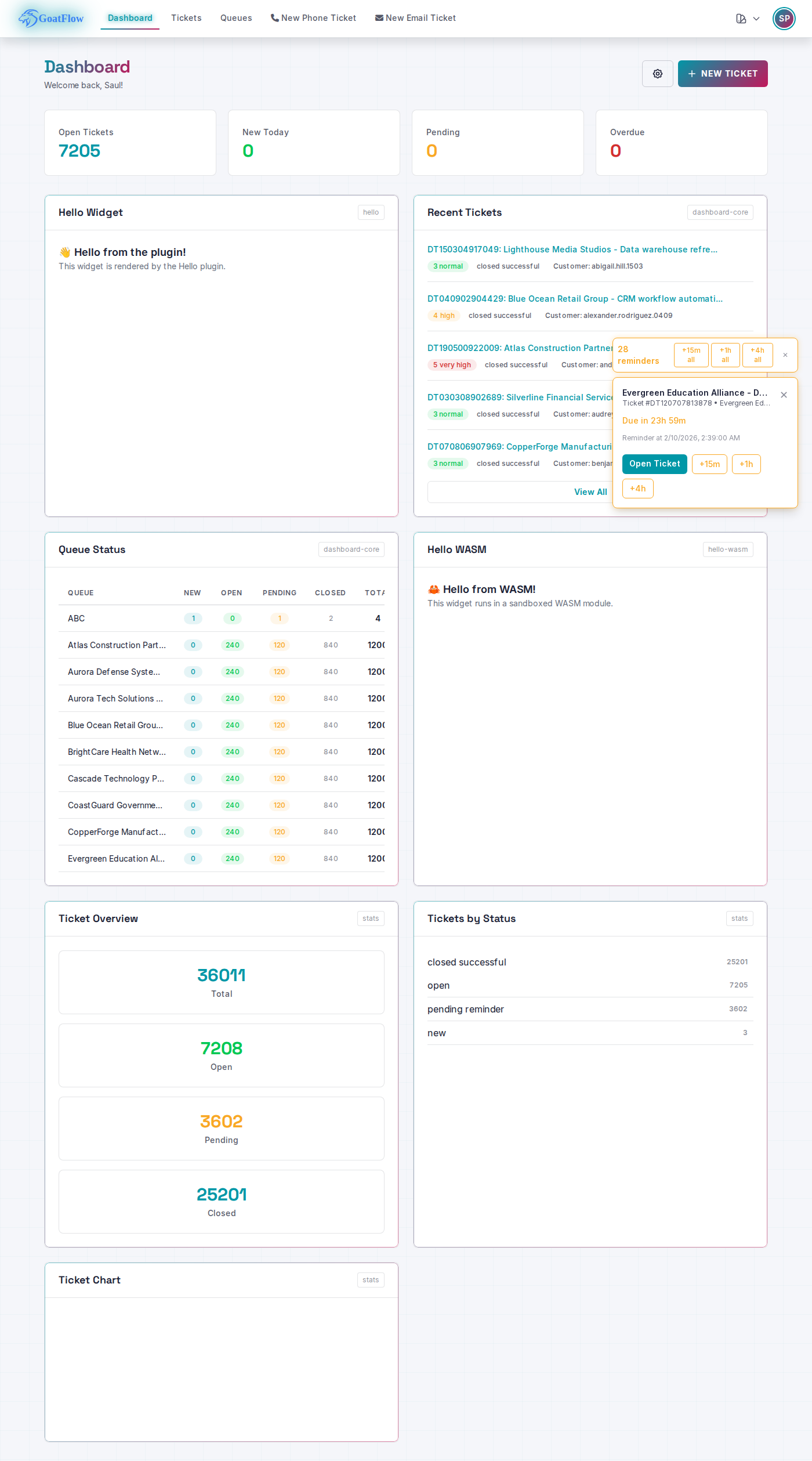
Plugin Platform: From Design to Implementation
The Problem
The 0.6.4 design doc outlined dual WASM/gRPC runtimes. Implementing it raised a practical question: how do plugins interact with the host application? A plugin that can query the database, send emails, and cache data needs a carefully designed API surface. Too restrictive and plugins are useless. Too permissive and you’ve created a security hole.
The Solution
We built a Host API layer that exposes specific capabilities through controlled functions. Plugins call host functions for database queries, caching, HTTP requests, email, and i18n. The host validates every call before executing it.
For WASM plugins, wazero’s sandbox means the plugin literally cannot do anything the Host API doesn’t explicitly allow. No filesystem access, no network calls, no memory outside its allocation. For gRPC plugins, process isolation provides the boundary — a misbehaving plugin crashes its own process, not the host.
The Statistics & Reporting module shipped as the first WASM plugin. It queries ticket data through the Host API and renders dashboard widgets — overview counts, status breakdowns, and trend charts. Building a real plugin immediately exposed rough edges in the API that unit tests wouldn’t have caught.
Plugin state uses the existing sysconfig tables rather than introducing new config files. One less thing to back up, migrate, or get out of sync.
The Benefits
The plugin system is proven, not theoretical. A working plugin exercises every layer: discovery, loading, Host API calls, widget rendering, and admin management. Third-party developers have a concrete example to follow, not just documentation.
The admin UI at /admin/plugins gives operators visibility and control. Enable, disable, check logs — without touching config files or restarting the application.
Two-Factor Authentication
The Problem
A ticketing system handles sensitive data — customer information, internal communications, access credentials in ticket bodies. Password-only authentication is a known weak point, especially when people reuse passwords across services.
The Solution
TOTP-based 2FA using standard authenticator apps. No proprietary protocol, no SMS (which is vulnerable to SIM swapping), no hardware token requirement. Google Authenticator, Authy, or any TOTP app works.
The implementation prioritised defence in depth:
- Session tokens use 256-bit random values with 5-minute expiry and IP binding. A stolen token from one network is useless on another.
- Rate limiting at 5 attempts prevents brute force against the 6-digit code space.
- Recovery codes (8 single-use, 128-bit entropy) handle the “lost my phone” scenario without requiring admin intervention for every case.
- Admin override exists for genuinely locked-out users, with audit logging.
We wrote a threat model document before writing code. Mapping attack vectors first — replay attacks, session fixation, brute force, social engineering — shaped the implementation rather than bolting security on after the fact.
The Benefits
75 tests cover the 2FA system: unit tests for token generation, security tests for rate limiting and session binding, and end-to-end Playwright tests for the full setup and login flow. The threat model document serves as both design rationale and security audit reference.
Both agents and customers get 2FA support, with the admin UI providing override controls for account recovery.
API Tokens and MCP Integration
The Problem
Programmatic access was limited to session cookies, which are awkward for automation scripts and impossible for AI integrations. The emerging MCP (Model Context Protocol) standard needed a proper authentication mechanism.
The Solution
Personal Access Tokens with scoped permissions. Each token specifies what it can do (tickets:read, tickets:write, admin:*) and inherits the owner’s RBAC permissions. A token owned by an agent who can only see the Support queue will only return Support queue data through the API.
The MCP server wraps GoatFlow’s API in the standard MCP tool format. AI assistants get ten tools out of the box: ticket CRUD, search, queue listing, user management, statistics, and SQL queries. Every operation filters through the token owner’s permissions.
SQL query access is restricted to admin group members. Even then, it runs through the application’s database connection with the application’s privileges — not a direct database credential.
The Benefits
Tokens use SHA256 hash storage (never plaintext) with a gf_ prefix for easy identification in logs and secret scanners. Scoped permissions follow the principle of least privilege — an automation script for reading ticket stats doesn’t need write access.
The MCP integration means AI assistants like Claude can search tickets, check statistics, and create tickets through a standardised interface, all respecting the existing permission model.
RBAC Across All Endpoints
The Problem
Statistics endpoints were returning unfiltered data. An agent with access to two queues could see ticket counts, trends, and metrics for every queue in the system through the API, even though the UI filtered correctly.
The Solution
Every statistics and queue endpoint now filters by the requesting user’s queue permissions. Dashboard counts, trend data, agent performance, customer stats, and CSV exports all go through RBAC filtering. Unauthorised access returns 404 rather than 403 — don’t confirm that a resource exists if the user shouldn’t know about it.
The Benefits
The permission model is consistent between UI and API. What you can see in the browser is exactly what you get through the API. No data leakage through direct endpoint access.
Demo Mode
The Problem
Public demo instances have a conflict: visitors need to explore freely, but they shouldn’t be able to change passwords, set up 2FA (locking others out), or permanently alter preferences for the next visitor.
The Solution
A middleware-based demo mode that:
- Blocks password and MFA changes for non-admin users
- Stores preferences (language, theme) in session-only cookies — when the browser closes, preferences reset
- Shows appropriate messaging (“disabled in demo mode”) rather than silently failing
The key decision was session-only cookies over database writes. Each visitor gets a clean experience regardless of what the previous visitor configured.
The Benefits
One environment variable (GOATFLOW_APP_DEMO_MODE=true) turns any instance into a safe demo. Combined with a nightly database reset cron job, the demo stays fresh and explorable.
Dark Theme Contrast
The Problem
GoatFlow supports multiple themes (Synthwave, Nineties Vibe, GoatFlow Classic, Seventies Vibes). Tailwind utility classes like bg-white, text-gray-700, and border-gray-200 are hardcoded throughout 65+ templates. In dark themes, white backgrounds and dark-on-dark text made content unreadable.
Editing every template to use theme variables would be a massive, error-prone change touching most of the codebase.
The Solution
338 CSS overrides in input.css remap Tailwind utility classes to theme CSS variables. .bg-white becomes background-color: var(--gk-bg-surface) in dark theme contexts. The templates don’t change at all.
The Benefits
Every dark theme benefits automatically from a single CSS file change. New themes get correct contrast without any template modifications. The approach is additive — it doesn’t break light themes or require ongoing maintenance as templates evolve.
Lessons
Building a plugin system, security features, and a demo mode in one release is a lot of surface area. The approach that worked: threat model security features before coding, build a real plugin to validate the platform (not just tests), and prefer CSS overrides to mass template edits when fixing visual issues across multiple themes.
The demo mode decision — session cookies over database writes — came from thinking about the second visitor, not just the first. Small design choices compound when software is used by real people.