Radiophonia 0.8.0 is the biggest reliability release the app has had. The headline feature is stream failover — if a station’s primary URL stops working, the app now finds alternate sources automatically and offers a one-tap switch without leaving the Now Playing screen. But the deep work was in the proxy layer, where a three-client connection limit had been causing a connect-evict-reconnect death spiral that looked like a flaky stream but was actually a flaky proxy.
Stream Failover: Why One URL Is Never Enough
The Problem
Radio stations change stream endpoints. CDNs return 502s. A station’s RadioBrowser entry might have four URLs, two of which are dead, one that serves silence, and one that works. The app had always used the first URL from the station data, and if it stopped working, the station was effectively dead until the next data refresh.
Curated stations had a different problem. When Bauer migrated Absolute Radio 20s from Sharp Stream to HLS, the old URL started returning HTTP 500 intermittently. The health checker would flag it dead, the entry would go dark, and nobody would notice until a user emailed asking why a station stopped working.
The Solution
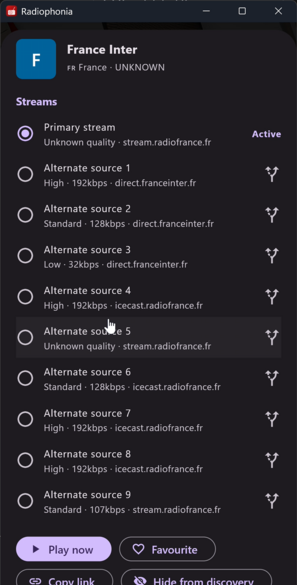
Alternate source discovery runs whenever a station’s details are shown. It looks for safe RadioBrowser duplicate records — same station name within the same country — and HLS master-playlist variants. Every candidate stream is validated before it reaches the UI: syntax checks ensure the URL has a valid HTTP/HTTPS scheme and hostname, and an HTTP HEAD request confirms it is reachable within a 5-second timeout. Unreachable or invalid streams are silently excluded.
The Station Details preview sheet shows all working sources with quality labels (High, Standard, Low), bitrate, and hostname. Tapping a different source switches playback immediately.
When the current stream fails to connect or drops, a “Try another source” button appears in the playback status banner. One tap cycles to the next available stream. The selected stream URL is persisted per-station through JSON serialization, so alternate source choices survive station list rebuilds.
Curated station definitions now support alternate_streams arrays and url_hq fields for high-quality fallback sources. The scheduled curated stream checker also retries transient HTTP 5xx, socket, handshake, and timeout failures before marking a bundled stream as dead. A single upstream 502 no longer takes a station offline permanently.
What the User Sees
Three things. First, a station with multiple sources shows them all, so you can pick the best one for your connection. Second, if the current source drops, a button appears with “Try another source” — one tap, back to listening. Third, your choice sticks. Switch to a different source, switch stations, come back, it’s still there.
The Proxy “Doom Loop”
The Problem
Some users reported a pattern where playback would start, play for a few seconds, drop, reconnect, play a few seconds, drop — endlessly. And another group reported the same ~30 seconds of audio repeating after a reconnection.
The cause of the first problem was a three-client connection limit in StreamProxyService. When an Android player started buffering, ExoPlayer opens overlapping sockets — one for the initial connection, one for buffering ahead. The proxy saw the second socket as a new client, hit the limit, and killed the first one. ExoPlayer then opened another connection to recover, hit the limit again, and the cycle repeated.
The second problem was the ring buffer. When the proxy’s upstream connection dropped and reconnected, the rolling audio ring buffer still held stale chunks from before the drop. If the player reconnected to the proxy within that window, it received old data seeded into the buffer, causing audio to repeat.
The Solution
The three-client eviction policy was removed entirely. Instead, a health-check timer polls every ten seconds and evicts clients that haven’t had a successful write in fifteen seconds. Per-client write failure tracking marks a client dead after three consecutive failures, evicting immediately rather than waiting for a TCP timeout.
The ring buffer now deduplicates on upstream reconnect. The first 2 KB of the new stream are searched for in the buffer, and any overlapping data is trimmed so new proxy clients start from the correct position.
The Lesson
Connection pools with hard limits that don’t understand your clients’ buffering behaviour are worse than no limits at all. Eviction should be based on health, not a magic number. And a rolling buffer without dedup on reconnect is just a cache of broken audio waiting to be served.
The same fix removed the secondary symptom: recording splits that happened during a reconnect cycle would split the same audio twice, since the proxy’s recording tee was attached to a proxy that kept dying and respawning.
Now Playing Screen Rework
The Problem
The Now Playing screen had accumulated layout problems across several releases. The horizontal volume slider and mute button overflowed in landscape. Album artwork could break the layout when metadata arrived mid-playback because the container switched from a sized avatar to an unconstrained album-art stack. The animated equalizer badge on large station avatars scaled up comically. The zoom gesture was missing entirely — you could stare at a beautiful album art thumbnail but never see it full-screen.
The Solution
Volume control moved from a horizontal slider to a vertical slider positioned on the left of the album artwork. This reclaimed horizontal space for other controls and made volume adjustment more intuitive. The duplicate slider and mute button were removed entirely.
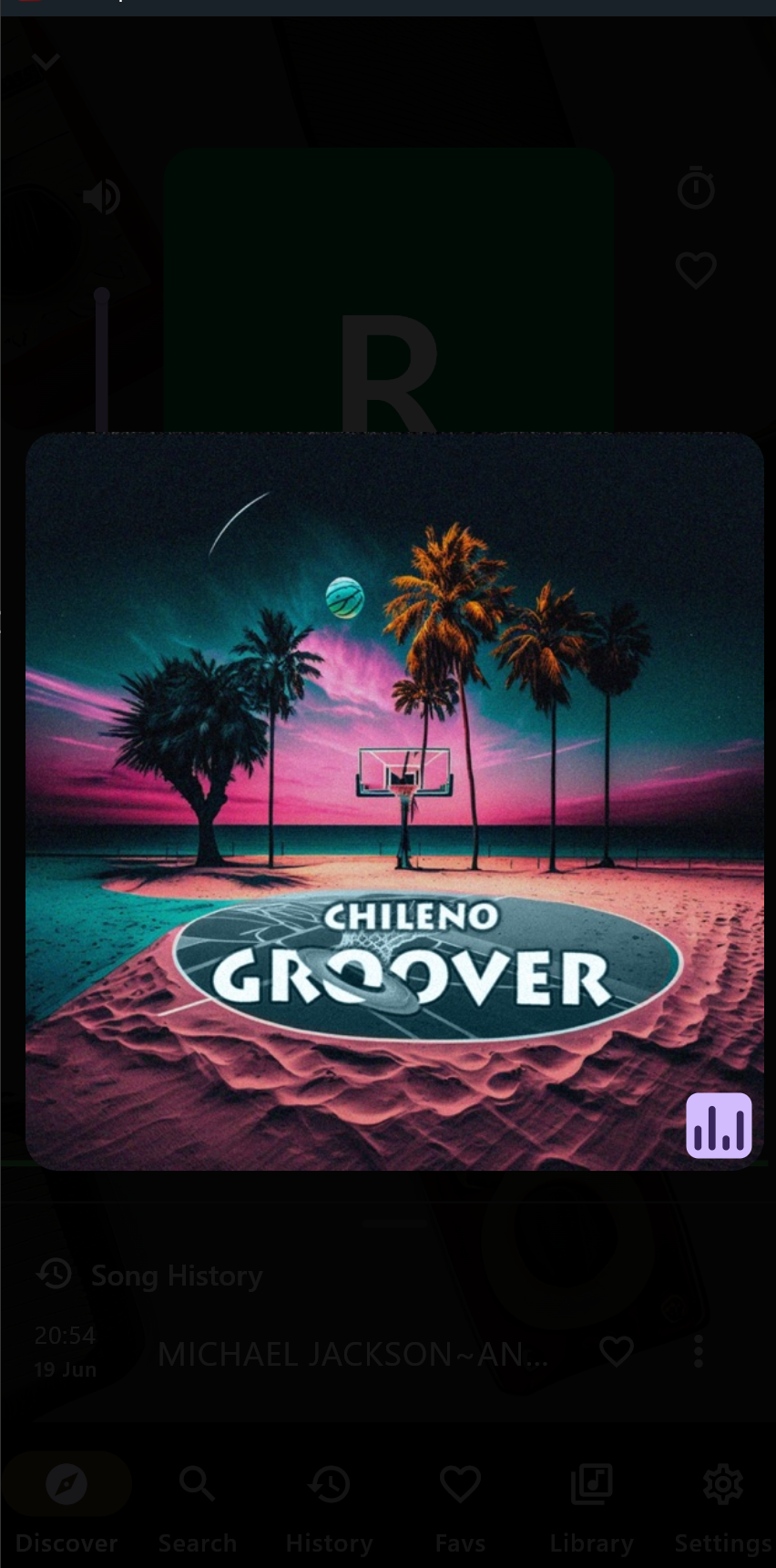
Double-tap to zoom — double-tap any album artwork or station avatar to open a full-screen view that fits within the viewport without cropping. Tap again to restore normal view. The artwork rebuilds at the dialog size so the enlarged version fills the available space.
Landscape navigation received a compact mode: the bottom bar drops to 56px, labels show only for the selected tab, and the secondary action controls use a wider two-column rail to prevent overflow.
The artwork collapse bug has a straightforward fix — the album art is kept in a fixed square container so it never breaks the layout when it arrives mid-playback. The equalizer badge is capped back to its original small size.
What the User Sees
A cleaner Now Playing screen that works in both orientations. Double-tap art to see it properly. Volume control that doesn’t fight for space. No more broken layout when album art arrives.
Context-Aware Station Controls
The Problem
Previous and next station controls used a global skip order — generally favourites sorted by listening time. If you were browsing stations in a country drill-down, found an interesting one, started listening, and wanted to skip to the next station in that same country list, the skip button would jump to a completely different station instead.
The Solution
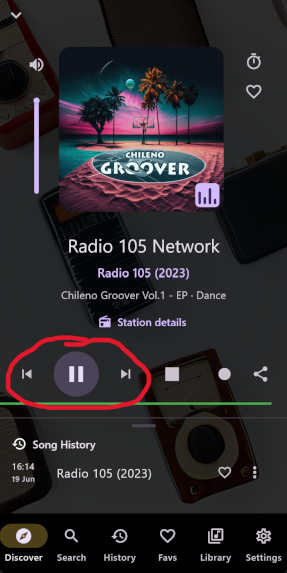
When you start a station from favourites, search results, Discover, recent stations, or a country/genre drill-down, the mini player captures the visible station list and the current position. Previous and next buttons move within that captured list. Voice commands and media-session (Android Auto, Bluetooth controls) follow the same list context when available, falling back to the original global order only when no context exists.
The implementation stores the context as a list of station references with the current index, and the skip logic checks for context before falling through to the default path. No new state management — the existing station-referencing types sufficed.
What the User Sees
If you search for “jazz” and start playing the first result, the skip buttons move through your search results, not through some unrelated global list. The same applies to countries, genres, favourites, and recent stations. It works from voice commands and car controls too.
Platform Fixes That Were More Than Version Bumps
iOS: Plain HTTP Radio Streams
Apple’s App Transport Security blocks plain HTTP by default. Most radio streams are HTTP, not HTTPS. The previous workaround was NSAllowsArbitraryLoads, which broadly disables ATS for all network traffic — the kind of blanket exemption that makes security reviewers twitch.
The fix is NSAllowsArbitraryLoadsForMedia, a six-character entitlement key that permits insecure loads specifically for media playback while keeping ATS active for everything else. Six characters in a plist file, and it took us a full release cycle to realise the narrow entitlement existed.
Android: Edge-to-Edge for SDK 35
Android 15 requires edge-to-edge rendering by default for apps targeting SDK 35. Without WindowCompat.setDecorFitsSystemWindows(window, false), the app draws under system bars but the insets are wrong. One line in MainActivity.kt, but the app would have crashed into the camera cutout on Pixel devices without it.
macOS: Recording Folder Permissions
When a user selects a recording folder through the native file picker on macOS, the sandbox grants a temporary security-scoped bookmark that expires when the app terminates. The fix stores a device-local security-scoped bookmark and opens the scope during every recording operation — creating, writing, finalizing, renaming files. The entitlement for user-selected read/write folder access was also missing from both Debug and Release profiles.
Windows: Where Are the DLLs?
libVLC worked in production builds because the DLLs sit next to the executable. In flutter run and flutter test, they live in windows/vlc/. The loader now probes four locations in order: the default DLL search path, the executable directory, <exe-dir>/vlc, and windows/vlc/ relative to the working directory. For each non-default candidate, it preloads libvlccore.dll by absolute path first, because Windows resolves a loaded DLL’s dependencies from the host-process directory rather than from the DLL’s own location.
The Store Split
The Problem
Radiophonia ships two distribution channels: direct download from radiophonia.app and the Google Play Store. The direct-download build needs MANAGE_EXTERNAL_STORAGE and WRITE_EXTERNAL_STORAGE for recording folders. The Play Store rejects both permissions for apps that aren’t file managers. The two builds had to diverge at the manifest level, but the CI pipeline was using the same build command for both, and someone could accidentally submit the wrong artifact.
The Solution
A store-safe Android build wrapper (scripts/build_android_store.sh) plus Makefile targets for store-flavour APK and AAB builds. The wrapper temporarily strips the full-flavour recording and storage permissions from the manifest, builds with FLAVOUR=store, and restores the manifest afterwards. A Gradle-level guard rejects the store build if the stripped permissions remain — so an accidental submission with full build recording permissions is impossible.
CI names the artifacts distinctly: radiophonia-${VERSION}-android.apk for full flavour, and the store build follows the standard Play Store naming. Amazon Fire TV builds produce radiophonia-${VERSION}-amazon-fire-tv.apk and are retained only in CI, not uploaded to the public repository.
The Lesson
Permission models are a distribution-channel problem, not just a platform problem. Google Play rejects MANAGE_EXTERNAL_STORAGE for non-file-manager apps. Direct-download users need it for recording folders. The two audiences cannot share a manifest, and the build pipeline must make the distinction explicit rather than relying on manual discipline.
Bauer HLS Metadata: When the Stream Tells You Nothing
The Problem
HLS streams don’t carry ICY metadata headers. Bauer stations (Absolute Radio, Capital, Heart, Smooth) serve their stream audio via HLS but publish now-playing data through a separate API at listenapi.bauerradio.com. Without ICY data, the Now Playing screen showed “Unknown” or stale station names, and the metadata enrichment pipeline had nothing to work with.
The Solution
StreamProxyService gained Bauer now-playing polling for HLS streams. When the proxy detects a non-BBC HLS stream, it polls listenapi.bauerradio.com/api9/initdadi/{station} periodically and integrates the response into the same metadata pipeline used by ICY streams. The metadata is available in Now Playing, history, notifications, and the recording file tags.
The integration also fixed a metadata-drift issue where album art and song info could appear one or more tracks ahead of audible playback on some stations. Metadata updates are now buffer-aligned so track info matches what you are actually hearing.
The Lesson
Protocol abstractions break when one protocol type doesn’t carry data that another does. The HLS + Bauer metadata bridge treats the external API as an extension of the stream protocol rather than a separate feature, keeping the metadata pipeline unified even when the source of that metadata is completely different from the audio source.
Smaller Things That Mattered
Browse country ISO search — two lines of normalization that let you type gb and find United Kingdom. Previously the search only matched against the display name. Now it normalises both the query and the stored values, matching against ISO country codes as well.
Search result playback restored — tapping a station in search results stopped working somewhere in the previous release cycle. It was a regression in how the search screen handled tap events. One-line fix.
Stale ICY metadata expiry — some stations emit one valid StreamTitle and then long runs of empty metadata blocks. The previous song title could stay stuck in the Now Playing screen indefinitely. Metadata now expires after a timeout and falls back to station context. Before clearing, the player tries a Shoutcast fallback lookup (/currentsong?sid=...) derived from the stream URL, so stations with sparse ICY updates still refresh track titles.
MusicBrainz artwork improvements — the lookup changed from checking one recording to iterating through ten, prioritising non-compilation releases. More local media files now show cover art.
Premium purchase progress — the premium service now updates isPurchaseInProgress during purchase and restore flows, so the UI doesn’t stay stuck showing “processing” or allow duplicate purchase taps.
Curated stream checker resilience — transient HTTP 5xx, socket, handshake, and timeout failures are retried before marking a stream as dead. And the checker now sends User-Agent: Radiophonia/1.0 and Icy-MetaData: 1 matching the app’s actual connection behaviour, so Sharp Stream servers stop returning HTTP 500 to probe requests.
Performance: Infinite Scroll
Browse by Country, Language, Genre, and Discover stations all used to load a single page of results. Large categories were silently capped. The drill-down lists now page using offset and limit as you scroll.
No architectural change — the existing RadioBrowser API supports pagination, the station list screen just wasn’t passing the parameters through. Two fields on the request builder, and categories with thousands of stations are now fully browseable.
By the Numbers
- 1
NSAllowsArbitraryLoadsForMediaentitlement replacing broad ATS disable - 2 separate Android distribution flavours with mutually exclusive permissions
- 3 consecutive write failures before a proxy client is evicted
- 4 VLC DLL search locations for Windows dev/test/production
- 5 second HTTP HEAD timeout for stream validation
- 10 recordings checked per MusicBrainz artwork lookup (was 1)
- 15 second write-idle threshold for client eviction
- 50 kbps+ bitrate display for every alternate source
- 502 errors that no longer kill a station permanently
- 26 achievement badges in development for the next release
Lessons
Stream failover sounds like a feature you bolt onto an existing player. In practice, building it exposed the brittleness of the underlying proxy architecture. The three-client eviction policy, the ring buffer without dedup, the single-URL assumption — each was a reasonable design call in isolation, and each became a bug when combined with real-world radio behaviour.
The platform fixes share a common pattern: a one-line entitlement or configuration change that took disproportionate effort to find. NSAllowsArbitraryLoadsForMedia exists as an Apple API but isn’t surfaced in most documentation. macOS sandbox bookmarks are well-documented but easy to miss in a Flutter project where the Dart layer abstracts platform details. Windows DLL loading differences between development and production environments are invisible until you run outside Visual Studio.
The store split was the most instructive process change. When one codebase needs to produce two distribution artifacts with different permission sets, the build pipeline must enforce the distinction. A wrapper script that temporarily modifies the manifest and a Gradle guard that rejects leftovers is the minimum viable safety net. The alternative — “just be careful” — works until it doesn’t, and the Play Store review team does not accept “we forgot” as a reason for including MANAGE_EXTERNAL_STORAGE.
Radiophonia 0.8.0 is available from radiophonia.app. Direct-download artifacts are published on the Radiophonia v0.8.0 release page.